

Have you ever wondered what actually happens in the heap when you type new MyObject()?
Behind this simple line of code lies a complex mechanism of memory allocation where every byte counts. To master Java performance, you need to answer these fundamental questions:
- Does the order of fields inside your class impact its size?
- How can the same class have different memory layouts across JVMs?
- Which under-the-hood optimizations can silently shrink your memory footprint?

Why does this matter? Understanding object layout isn’t just theoretical. Smaller objects mean better heap density, reduced GC pressure, improved cache locality, and ultimately, a significant boost in CPU efficiency.
In this deep dive, we will explore the inner workings of the HotSpot JVM to see how it stores Java objects in memory.
We will deconstruct memory addresses, compressed references (OOPs), and class pointers to see how they form the final object layout. We will also analyze why object headers are often the hidden “tax” on your heap and how Project Lilliput is revolutionizing Java 25 by making them smaller than ever.
To turn theory into reality, we will use JOL (Java Object Layout), the OpenJDK tool that allows us to inspect the exact byte-by-byte structure of your objects.
Note:
This article specifically focuses on the 64-bit HotSpot JVM implementation as shipped with Amazon Corretto 25. Some details discussed here, especially object layout, object headers, compressed references, and JVM flags, are implementation-specific and may not apply exactly the same way to other JVM implementations or versions. Also, in this article, memory sizes use binary units. For readability, we may write KB, MB, and GB, but they should be understood as KiB, MiB, and GiB.
A quick reminder: how memory addresses work
Before we jump into the details of Java object layout, let’s first clarify how memory addresses work.
At the hardware level, memory can be seen as a large sequence of bytes. Each byte has its own address, which allows the processor to locate and access data stored in memory.
On a 32-bit system, memory addresses are encoded using 32 bits. This means the system can represent up to:
2^32 = 4,294,967,296 ≈ 4 GB
So, in theory, a 32-bit address space can address up to 4 GB of memory.
On a 64-bit system, addresses are encoded using 64 bits. This gives a much larger theoretical address space:
2^64 = 18,446,744,073,709,551,616 ≈ 16 EB
That is roughly 16 EB of addressable memory.
The example below demonstrates the difference between 32-bit and 64-bit addressing through hexadecimal representation.
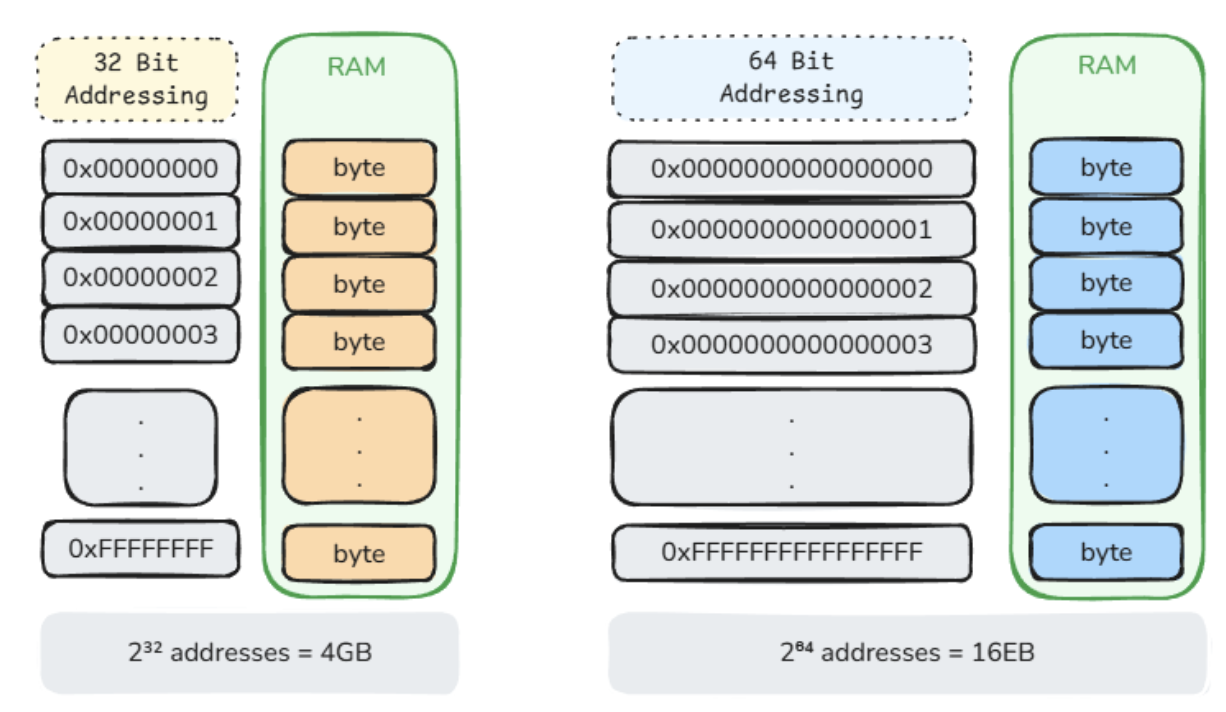
At first glance, 64-bit addressing looks like the obvious solution: more addressable memory, fewer limitations. But there is a trade-off. A 64-bit address is twice as large as a 32-bit address. This means that references to objects may consume more memory.
For Java applications, this matters because object references are everywhere: inside objects, arrays, collections, and so on. If every reference takes more space, the whole heap can become larger.
So, can we find a compromise between 32-bit and 64-bit addressing? Can we keep the compactness of 32-bit values while addressing more than 4 GB of memory? Surprisingly, yes — if we stop thinking in terms of individual bytes.
A classic 32-bit address can represent 2³² different values. If each value points to one byte, we get:
2³² × 1 byte = 4 GB
But what if each value pointed not to a single byte, but to a block of 8 bytes?
2³² × 8 bytes = 32 GB
This is where alignment and bit shifting become useful. If objects are aligned on 8-byte boundaries, their addresses are always multiples of 8:
0, 8, 16, 24, 32, …
In binary, multiples of 8 always end with three zero bits. Since these bits are predictable, we do not need to store them. We can store a smaller 32-bit value and recover the real address by shifting it left by 3 bits:
real address = stored value << 3
In other words, the stored value is not a direct byte address anymore. It is more like an index into 8-byte memory blocks:
stored value:  0   1   2   3   4
real address:  0   8   16  24  32
This gives us a clever middle ground: references remain 32-bit wide, but they can address up to 32 GB of aligned memory. This idea is one of the foundations behind HotSpot’s compressed references, which we will explore next.
The example below demonstrates 32-bit addressing with a 3-bit shift using binary representation.
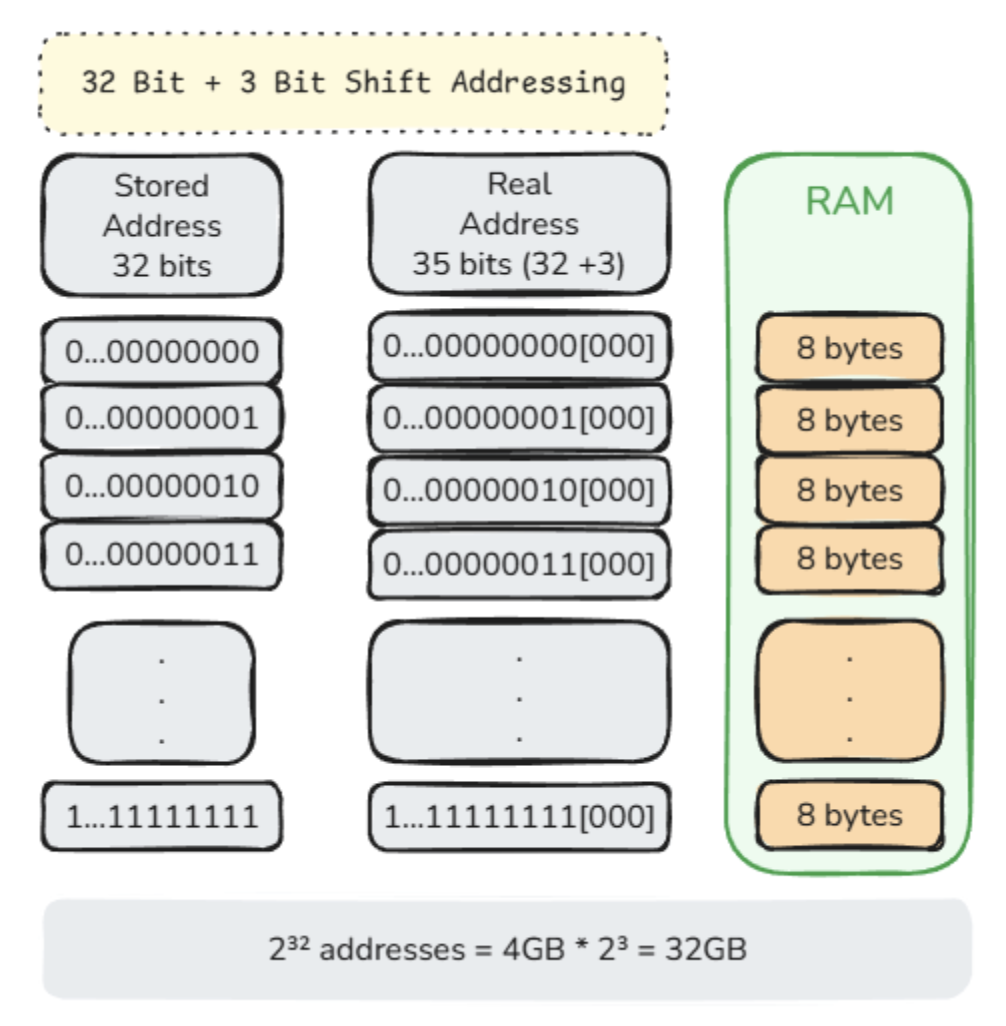
The same logic can be extended with larger alignment values. If memory is aligned on larger blocks, more low-order bits are always zero, so more bits can be omitted from the stored reference:
8-byte alignment  -> 3-bit shift -> 2³² × 8  = 32 GB
16-byte alignment -> 4-bit shift -> 2³² × 16 = 64 GB
32-byte alignment -> 5-bit shift -> 2³² × 32 = 128 GB
But this comes with a cost. If objects must start at larger boundaries, the JVM may need to add more unused bytes between objects to respect that alignment. These unused bytes are called padding. More padding means more wasted memory, which can lead to internal fragmentation.
For example, with 8-byte alignment, an object may need a few bytes of padding to reach the next 8-byte boundary. With 16-byte or 32-byte alignment, the padding can become larger. So while larger alignment increases the addressable heap range, it can also reduce memory efficiency.
Ordinary Object Pointers
Now that we have seen how memory addresses work, let’s bring the discussion back to Java objects.
In Java, when you create an object like this:
MyClass obj = new MyClass();
the JVM allocates memory for the new object in the heap. The variable obj does not contain the object itself. Instead, it contains a reference that allows the JVM to locate that object in memory.
In HotSpot terminology, this kind of reference is called an Ordinary Object Pointer, usually abbreviated as OOP.
On a 64-bit JVM, an ordinary object pointer is represented as a 64-bit value, which means it occupies 8 bytes. This gives the JVM access to a very large address space, but it also has an important downside: every object reference becomes larger. When an application contains millions of objects, this overhead becomes significant.
Compressed OOPs
Compressed OOPs, often written as COOPs, are an optimization used by the HotSpot JVM to reduce the memory footprint of object references.
Instead of storing object references as full 64-bit values, HotSpot can store them as 32-bit compressed values and decode them when needed.
The idea is based on the alignment and bit-shifting mechanism we introduced earlier.
The default object alignment in Hotspot JVM is 8 bytes.
If the alignment is increased, the addressable range also increases:
ObjectAlignmentInBytes=8   -> 3-bit shift -> up to 32 GB
ObjectAlignmentInBytes=16  -> 4-bit shift -> up to 64 GB
ObjectAlignmentInBytes=32  -> 5-bit shift -> up to 128 GB
In practice, compressed OOPs are usually a very good optimization because many Java applications do not need a heap larger than the compressed reference limit. By using 32-bit references instead of 64-bit references, the JVM can significantly reduce heap usage, improve object density, reduce GC pressure, and improve cache locality.
HotSpot enables compressed OOPs by default. However, if the heap is too large to be represented with compressed OOPs under the selected alignment, HotSpot fall back to full 64-bit ordinary object pointers.
You can explicitly disable them with:
-XX:-UseCompressedOops
And you can configure object alignment with:
-XX:ObjectAlignmentInBytes=8
Inspecting the JVM layout with JOL
So far, we have discussed references or OOPs, compressed OOPs, alignment, and bit shifting from a theoretical point of view. Now let’s verify what the JVM is actually using.
For that, we can use JOL, the Java Object Layout tool from OpenJDK. JOL is designed to inspect object layouts, field sizes, reference sizes, alignment, and other low-level JVM layout details. The jol-core artifact is available from Maven Central as org.openjdk.jol:jol-core.
We can ask JOL to print the current JVM layout details:
void main() {
   IO.println(VM.current().details());
}
On my environment, using the 64-bit HotSpot JVM shipped with Amazon Corretto 25, this prints:
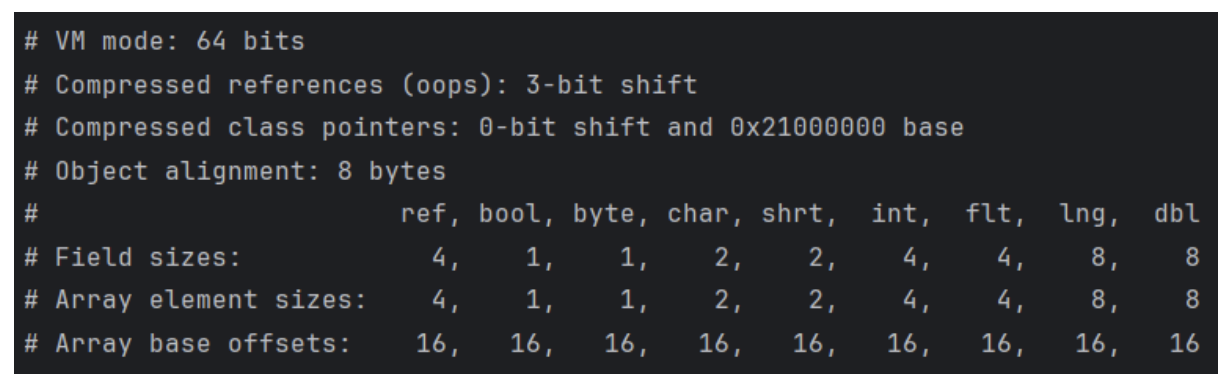
This output confirms several important things.
First, the JVM is running in 64-bit mode:
# VM mode: 64 bits
Second, object references are compressed:
# Compressed references (oops): 3-bit shift
Why 3 bits? Because the JVM reports:
# Object alignment: 8 bytes
This matches the explanation from the previous section.
We will revisit compressed class pointers later in the article.
JOL also reports the size of reference fields and primitive fields:
#                       ref, bool, byte, ...
# Array element sizes:    4,    1,    1, …
The first value, ref = 4, tells us that object reference fields use 4 bytes with compressed OOPs enabled.
The same applies to arrays of references:
#                       ref, bool, byte, ...
# Array element sizes:    4,    1,    1, …
So an Object[] array stores each reference using 4 bytes when compressed OOPs are enabled.
Finally, JOL reports:
#                       ref, bool, byte, ...
# Array base offsets:    16,   16,   16, …
This means that, in this JVM configuration, the first element of any array starts 16 bytes after the beginning of the array object. The bytes before that are used by the JVM to store the array header, including object metadata and the array length. We will revisit this later when we inspect object headers and array layouts in detail.
If we explicitly turn off compressed OOPs using -XX:-UseCompressedOops or if we configure the JVM with a heap size that exceeds the compressed OOPs addressable range, HotSpot will disable compressed references and fall back to full 64-bit ordinary object pointers.
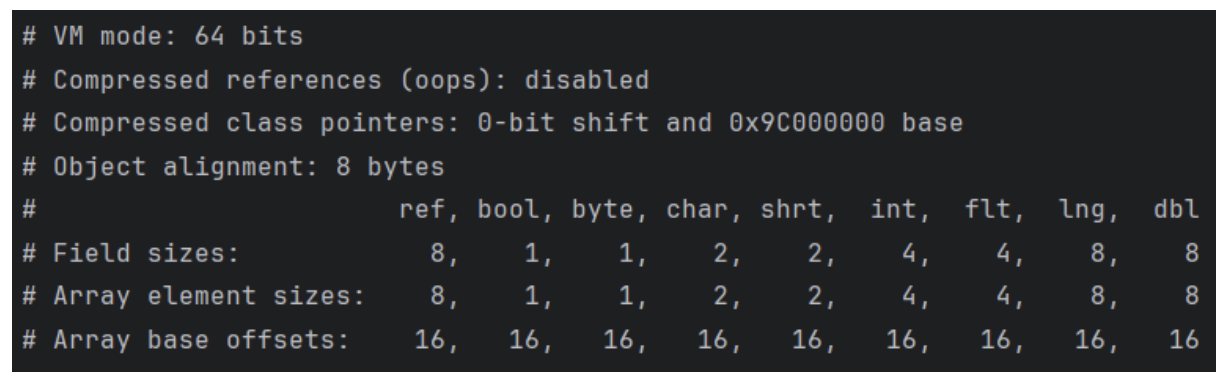
As shown in the JOL output, compressed references are now disabled:
# Compressed references (oops): disabled
As a consequence, reference fields and reference array elements now occupy 8 bytes instead of 4:
#                       ref, ...
# Field sizes:            8, ...
# Array element sizes:    8, …
This means that every object reference stored in an object field or inside an object array now consumes twice as much memory compared to the compressed OOPs configuration.
Metaspace and class metadata
When the JVM sees an object in memory, it needs to know what this object represents. For example:
- What is its class?
- What fields does it have?
- What methods are available?
- What is its superclass?
- Which interfaces does it implement?
This information is not stored inside every object individually. That would be extremely wasteful. Instead, HotSpot stores shared runtime metadata for each loaded class.
This metadata is stored outside of the Java heap, in a native memory region called Metaspace.
In other words, Metaspace is off-heap memory managed by the JVM itself. It contains the runtime representation of loaded Java classes.
This class metadata includes structures such as:
Klassstructures,- method metadata,
- constant pools,
- annotations,
- and other runtime structures needed by the JVM.
So, while Java objects live in the heap, the metadata describing their classes lives in Metaspace.
Before Java 8, this metadata was stored in the Permanent Generation (PermGen). Starting with Java 8, PermGen was removed and replaced with Metaspace.
Every object points to class metadata
Java objects do not carry their class information directly. Each object only stores a pointer to its Klass structure, and the shared class metadata lives once in Metaspace.
A Klass structure is the JVM’s internal representation of a loaded Java class. It contains, the metadata needed to describe that class at runtime: its name, superclass, implemented interfaces, field layout, etc. This structure allows HotSpot to identify the object’s runtime class and interpret its memory layout correctly.
Conceptually, it looks like this:
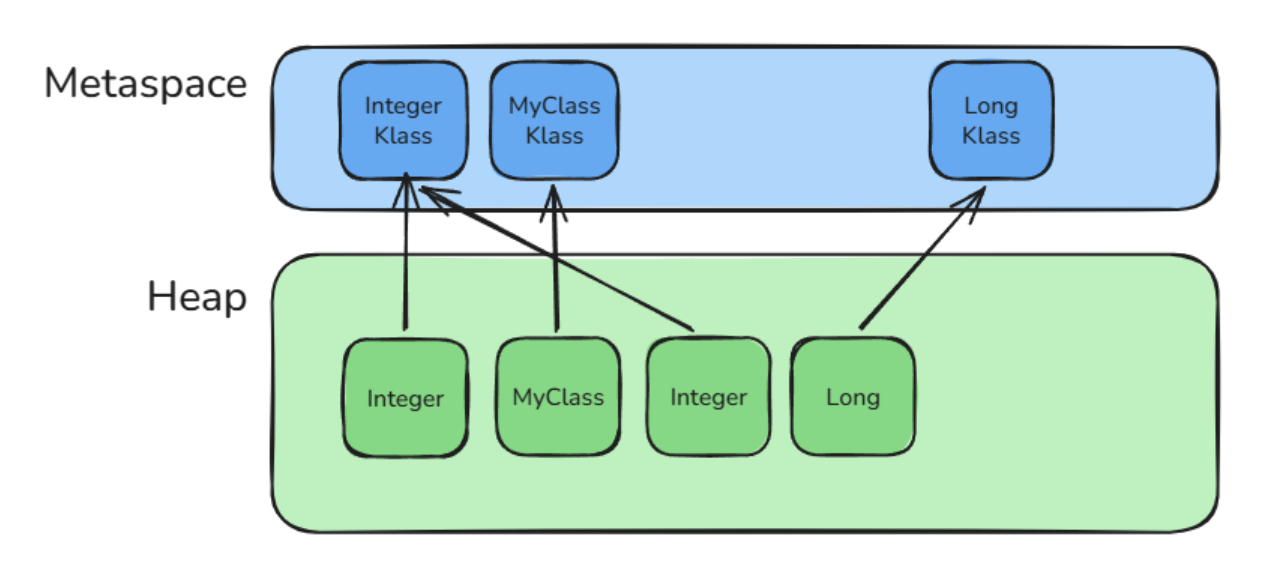
On a 64-bit HotSpot JVM, the pointer to the Klass structure would naturally be a 64-bit native pointer, meaning it would occupy 8 bytes.
Compressed Class Pointers
Just like ordinary object pointers can be compressed, HotSpot can also compress class metadata pointers.
This optimization is called Compressed Class Pointers. When enabled, the klass pointer stored inside object headers uses a 32-bit compressed representation instead of a full 64-bit native pointer.
When compressed class pointers are enabled, HotSpot separates Metaspace into two logical regions:
- the Compressed Class Space
- and the Non-Class Space.
The Compressed Class Space is a reserved native memory region dedicated to storing Klass structures. Since compressed class pointers are only 32 bits wide, the JVM must place these structures inside a restricted address range so they can still be addressed using compressed pointers.
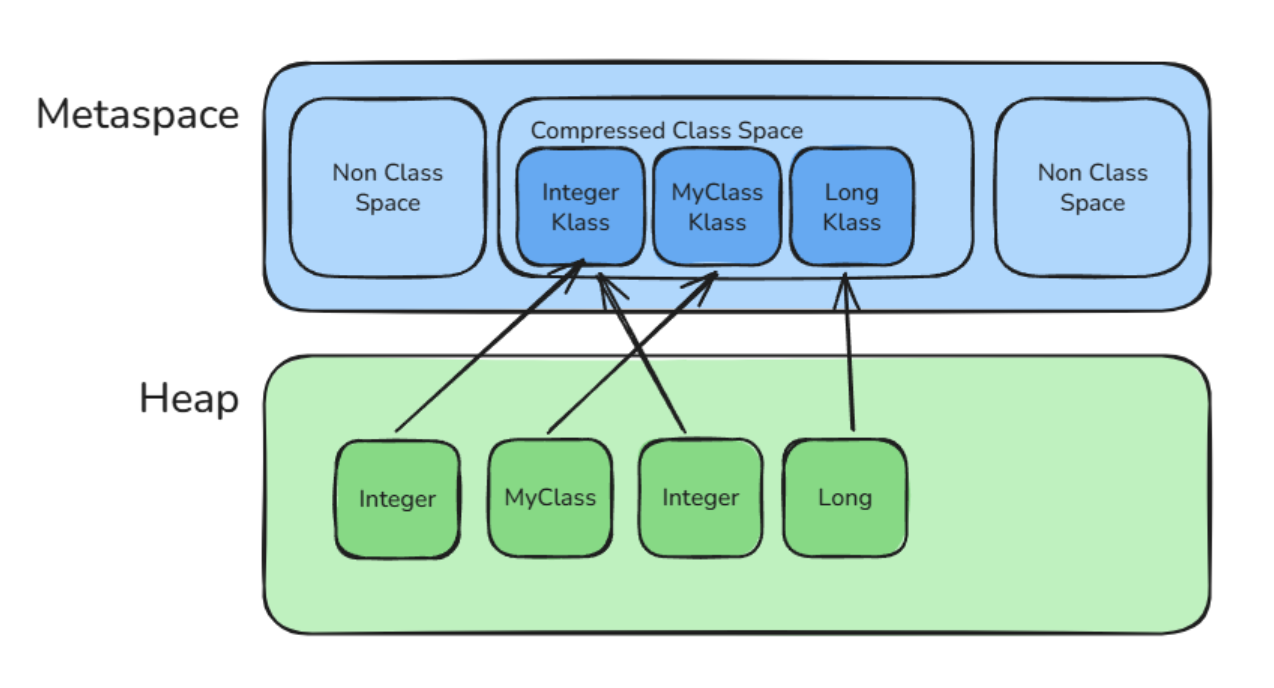
The size of the Compressed Class Space is controlled by the following JVM flag:
-XX:CompressedClassSpaceSize
Since HotSpot needs to reserve the Compressed Class Space upfront, this value cannot be undefined. If the flag is not explicitly provided, the JVM uses a default value of 1 GB.
A Klass structure typically occupies between 512 bytes and 1024 bytes, with an average size of roughly 768 bytes.
Based on that approximation, the default 1 GB Compressed Class Space can host roughly 1.4 million Klass structures:
1 GB / 768 bytes ≈ 1,398,101 Klass structures
One important limit to note is that HotSpot caps CompressedClassSpaceSize at 4 GB.
So, with compressed class pointers enabled, the upper bound becomes:
4 GB / 768 bytes ≈ = 5,592,447 Klass structures
In other words, at the maximum Compressed Class Space size, the limit is roughly 5.6 million Klass structures. In practice, this limit is extremely large for real-world applications. Even very large enterprise applications typically load only a few tens of thousands of classes.
Of course, this is only a simplified estimate. The real number depends on the actual size of each Klass structure, which varies depending on the class shape, number of fields, methods, interfaces, and other metadata.
HotSpot enables Compressed Class Pointers by default.
Inspecting Metaspace with jcmd
We can inspect Metaspace usage at runtime using jcmd.
First, find the process id of the running Java application:
jcmd
Then run:
jcmd <PID> VM.metaspace
This command prints detailed information about Metaspace, including the usage of the Compressed Class Space and the Non-Class Space.

Object layout overview
So far, we have discussed ordinary object pointers, compressed ordinary object pointers, class pointers, and compressed class pointers.
We now have all the pieces needed to understand how a Java object is actually laid out in the heap.
In HotSpot, every object stored in the heap follows a well-defined memory structure. Conceptually, an object is made of three main parts:
- the object header,
- the instance data,
- and optional padding.
The object header is the metadata stored by HotSpot at the beginning of every object. It allows HotSpot to manage the object at runtime. The header contains two main parts: Mark Word and Klass Word. For arrays, the header also contains the array length.
The instance data contains the actual fields declared in the Java class.
The padding is made of unused bytes added by the JVM to satisfy alignment constraints. Since objects are aligned on specific byte boundaries, usually 8 bytes by default, HotSpot may need to add extra bytes so that the next object starts at a correctly aligned address.
So, at a high level, an object looks like this:
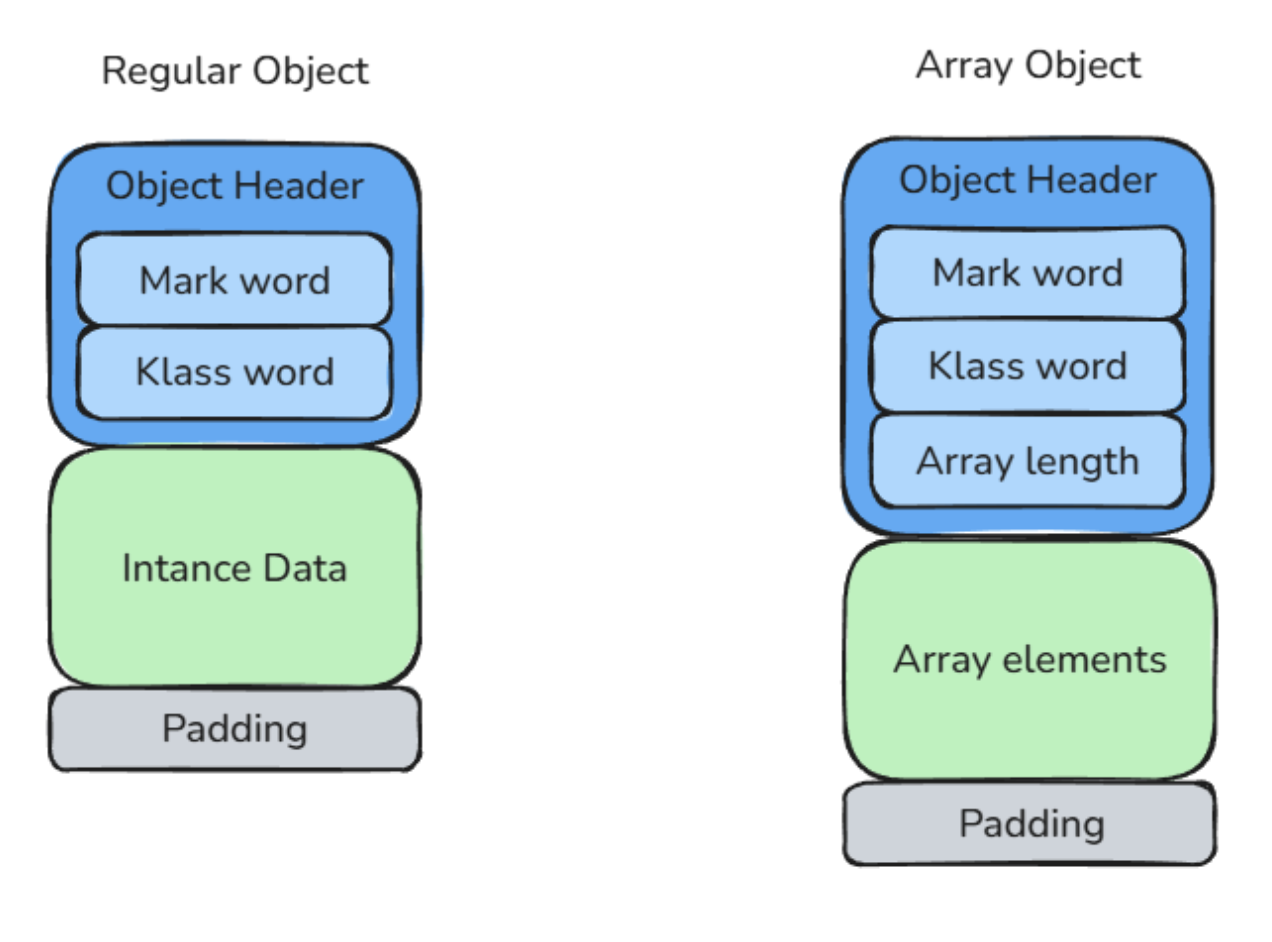
In the next sections, we will look at each part in more detail, starting with the object header.
Object header: Mark word
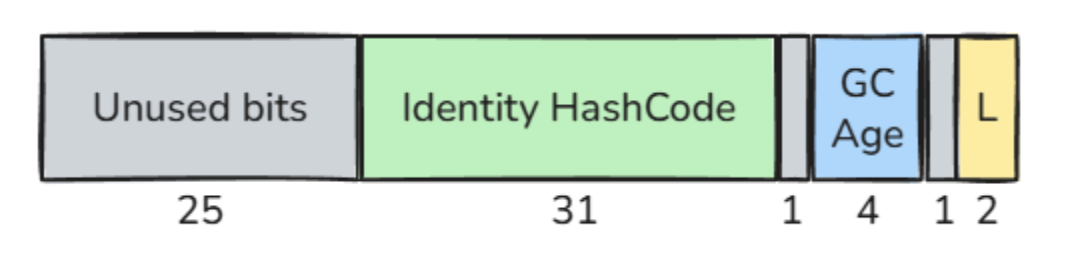
The Mark Word is a 64-bit field stored at the beginning of every Java object header.
It contains several pieces of runtime metadata that HotSpot needs to manage the object:
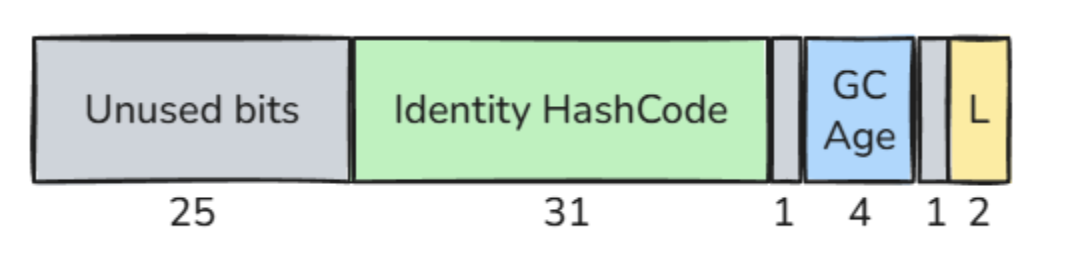
25 bits  Unused bits
31 bits  Identity hash code
1  bit   Unused historical bit (CMS)
4  bits  Object age
1  bit   Unused historical bit (Biased Locking)
2 bits   Lock state
The identity hash code is the value associated with System.identityHashCode(object). It uses 31 bits.
The object age is used by the garbage collector. It represents how many young-generation garbage collections the object has survived. This value is stored using 4 bits.
The lock bits use 2 bits and describe the synchronization state of the object. They are used when the object participates in synchronization and used as a monitor. Depending on the situation, these bits can represent states such as unlocked, locked, inflated or forwarded.
Some bits also have historical meaning.
Bit number 7 was previously used by the Concurrent Mark-Sweep collector, also known as CMS. Since CMS was removed in Java 17, this bit is no longer used for that purpose.
Bit number 2 was previously used for biased locking. Since biased locking was removed in Java 19, this bit is no longer used for that purpose either.
As a result, in the current HotSpot implementation, part of the Mark Word is unused (27 bits). This is one of the reasons why Project Lilliput can rethink how object header metadata is represented and make the object header more compact.
Object header: Klass word
The Klass Word, also called the class pointer, allows the JVM to know the type of the object.
It points to the object’s Klass structure, which is stored in Metaspace and contains the runtime metadata of the class.
As we saw earlier, this pointer can be stored in two different forms.
- Without compressed class pointers, the Klass Word occupies 8 bytes.
- With compressed class pointers enabled, it occupies only 4 bytes.
This is why compressed class pointers directly affect the size of the object header.
Object header: Array length
Arrays are objects too, but they need one extra piece of metadata: their length.
The JVM must know how many elements an array contains in order to perform bounds checks, compute element offsets, and safely access array contents.
That length is stored directly in the array header as a 4-byte integer.
This field exists only for array objects. Regular objects do not have an array length field.
Instance data
After the object header comes the instance data.
This is where HotSpot stores the actual fields declared in the Java class.
For example:
class User {
   long id;
   int age;
   boolean active;
}
The values of id, age, and active are stored in the instance data part of the object.
Each field occupies space according to its type:
boolean / byte  -> 1 byte
char / short    -> 2 bytes
int / float     -> 4 bytes
long / double   -> 8 bytes
reference       -> 4 bytes with compressed oops, 8 bytes otherwise
To reduce memory waste, HotSpot does not necessarily store object fields in the same order in which they are declared in the Java source code.
Instead, it may reorganize fields in memory to produce a more compact layout and reduce padding.
The layout follows a few important rules.
First, each field must be placed at an offset compatible with its size. For example, a 4-byte int is placed at an offset that is a multiple of 4, and an 8-byte long or double is placed at an offset that is a multiple of 8. When there is not enough space at the current offset, HotSpot inserts padding bytes to fill the gap.
Second, HotSpot groups fields by size to reduce internal fragmentation. Larger fields are placed first, followed by smaller ones. Conceptually, the order is:
longs and doubles
ints and floats
chars and shorts
bytes and booleans
references
Third, Inheritance also matters. HotSpot lays out fields starting from the superclass fields first, then adds the fields declared by the subclass.
As a result, the physical field order in memory may be different from the order written in the Java class.
Padding
Once the instance fields are placed, HotSpot may still add padding at the end of the object so that the total object size respects the configured object alignment.
This is why the memory footprint of an object is not only the sum of its fields. It is the sum of:
object header + instance data + padding
Inspecting real object layouts with JOL
So far, we have discussed object headers, instance data, compressed pointers, and alignment from a conceptual point of view.
But what does the actual memory layout produced by the JVM look like?
To answer that question, we can use JOL, the Java Object Layout tool from OpenJDK. JOL allows us to inspect how HotSpot organizes objects in memory, including:
- object headers,
- field offsets,
- padding,
- alignment gaps,
- and the final object size.
This gives us a concrete way to verify the concepts discussed so far.
In the following examples, we will use ClassLayout.parseClass(...).toPrintable() to inspect the memory layout generated by the JVM.
Example 1: An empty object
class Empty {
}

void main() {
   IO.print(ClassLayout.parseClass(Empty.class).toPrintable());
}
On a 64-bit HotSpot JVM, the output is:
OFF  SZ   TYPE DESCRIPTION                VALUE
 0   8        (object header: mark)     N/A
 8   4        (object header: class)    N/A
12   4        (object alignment gap)
Instance size: 16 bytes
Space losses: 0 bytes internal + 4 bytes external = 4 bytes total
This output illustrates several important concepts.
The object starts with:
- an 8-byte Mark Word,
- followed by a 4-byte compressed Klass Word.
At this point, the object occupies 12 bytes.
However, HotSpot aligns objects on 8-byte boundaries by default. Since 12 is not a multiple of 8, the JVM adds 4 bytes of padding.
As a result, even an empty Java object occupies 16 bytes.
Example 2: A simple object with fields
class User {
   int age;
   long id;
   boolean active;
}

void main() {
   IO.print(ClassLayout.parseClass(User.class).toPrintable());
}
OFF  SZ      TYPE DESCRIPTION                VALUE
 0   8           (object header: mark)     N/A
 8   4           (object header: class)    N/A
12   4       int User.age                  N/A
16   8      long User.id                   N/A
24   1   boolean User.active               N/A
25   7           (object alignment gap)
Instance size: 32 bytes
Space losses: 0 bytes internal + 7 bytes external = 7 bytes total
Several things are worth noticing here.
First, fields do not necessarily eliminate padding completely. Even though the object contains only:
- 4 bytes for
age, - 8 bytes for
id, - 1 byte for
active,
the total object size becomes 32 bytes.
This happens because HotSpot must align both fields and object boundaries correctly.
The boolean field occupies only 1 byte, but the final object size must still be rounded up to the next multiple of the object alignment.
As a result, HotSpot adds 7 bytes of trailing padding.
Example 3: field reordering and padding
class Reordering {
   Reordering reordering;
   boolean enabled;
}

void main() {
   IO.print(ClassLayout.parseClass(Reordering.class).toPrintable());
}
Even though the reference field is declared before the boolean field, JOL prints the following layout:
OFF  SZ               TYPE DESCRIPTION                VALUE
 0   8                    (object header: mark)     N/A
 8   4                    (object header: class)    N/A
12   1            boolean Reordering.enabled        N/A
13   3                    (alignment/padding gap)
16   4   Main.Reordering Reordering.reordering     N/A
20   4                    (object alignment gap)
Instance size: 24 bytes
Space losses: 3 bytes internal + 4 bytes external = 7 bytes total
As we said earlier, HotSpot may reorder fields. In this case, the boolean field is placed before the reference field, even though the reference is declared first in the source code.
Since the boolean field occupies only 1 byte, it is placed at offset 12, right after the object header.
The reference field occupies 4 bytes with compressed oops enabled, so it must be placed at an offset that is a multiple of 4. The next valid offset after 13 is 16, so HotSpot adds 3 bytes of alignment/padding gap between the boolean field and the reference field.
Example 4: disabling compressed oops and compressed class pointers
Now let us run the same example again, but this time with compressed ordinary object pointers and compressed class pointers disabled:
java -XX:-UseCompressedOops -XX:-UseCompressedClassPointers …
We keep the same class:
class Reordering {
   Reordering reordering;
   boolean enabled;
}

void main() {
   IO.print(ClassLayout.parseClass(Reordering.class).toPrintable());
}
With this configuration, both the class pointer and the object reference are stored as full 64-bit values.
OFF  SZ               TYPE DESCRIPTION                VALUE
 0   8                    (object header: mark)     N/A
 8   8                    (object header: class)    N/A
16   1            boolean Reordering.enabled        N/A
17   7                    (alignment/padding gap)
24   8   Main.Reordering Reordering.reordering     N/A
Instance size: 32 bytes
Space losses: 7 bytes internal + 0 bytes external = 7 bytes total
This time, the object header occupies 16 bytes. The reference field also occupies 8 bytes because compressed oops are disabled.
As we said earlier, the boolean field is placed before the reference field. It is stored at offset 16 and occupies 1 byte.
The reference field must now be placed at an offset that is a multiple of 8. The next valid offset after 17 is 24, so HotSpot adds 7 bytes of alignment/padding gap between the boolean field and the reference field.
Example 5: Array layout
Arrays have a slightly different structure because they also store their length inside the header. Note that, when inspecting actual object instances, we use ClassLayout.parseInstance() instead of ClassLayout.parseClass().
void main() {
   IO.print(ClassLayout.parseInstance(new int [5]).toPrintable());
}
OFF  SZ   TYPE DESCRIPTION                VALUE
 0   8        (object header: mark)     0x0000000000000001
 8   4        (object header: class)    0x00184b48
12   4        (array length)             5
16  20    int [I.<elements>             N/A
36   4        (object alignment gap)
Instance size: 40 bytes
Space losses: 0 bytes internal + 4 bytes external = 4 bytes total
The first 16 bytes correspond to the array header:
- 8 bytes for the Mark Word,
- 4 bytes for the compressed Klass Word,
- 4 bytes for the array length.
The array elements start immediately after the header.
Since the array contains 5 integers:
5 × 4 bytes = 20 bytes
The total becomes:
16 + 20 = 36 bytes
Finally, HotSpot adds 4 bytes of padding so the total object size becomes 40 bytes.
Project Lilliput and compact object headers
At this point, we can clearly see that object headers are not cheap.
Even the simplest Java object usually occupies at least 16 bytes before storing any useful application data. For small objects, the header can represent a very large percentage of the total memory footprint.
For example, an object containing only a single boolean field may still occupy 16 or even 24 bytes depending on the JVM configuration and alignment constraints.
When an application creates millions or billions of objects, this overhead becomes significant.
This is exactly the problem that Project Lilliput tries to address.
Project Lilliput is an OpenJDK project whose goal is to reduce the size of Java object headers in HotSpot.
The main idea behind Project Lilliput is to reduce this header from 12 bytes/ 16 bytes to a single 8 bytes word. This optimization is called Compact Object Headers.
Conceptually, the JVM attempts to combine: locking information, GC metadata, identity hash code and class pointer inside a single 64-bit Mark Word.
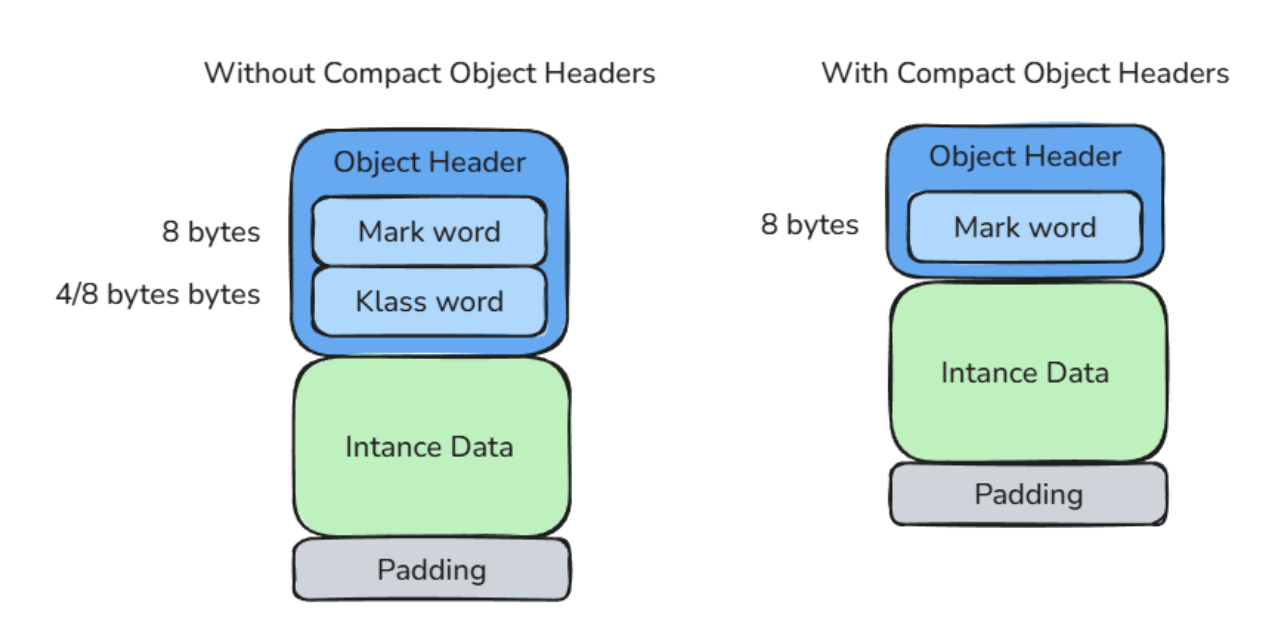
How does the JVM manage to fit all of that into a single 64-bit header?
To understand this, let us go back to the Mark Word.
As we saw earlier, the Mark Word already occupies 64 bits. It stores information such as the identity hash code, the object age, and the locking state. But not all of its bits are actively used. In the current layout, several bits are still available.
Project Lilliput takes advantage of this unused space.
The challenge is the Klass Word. With compressed class pointers enabled, the Klass Word normally occupies 32 bits. If we want to merge it into the Mark Word, we need to make it smaller.
This is where alignment comes back into the picture.
Earlier, we saw that compressed ordinary object pointers work by relying on object alignment. Since objects are aligned on 8-byte boundaries, their addresses always have three zero bits at the end. The JVM can omit those bits and recover the real address later by shifting the compressed value.
Project Lilliput applies a similar idea to class metadata.
Klass structures inside the Compressed Class Space are aligned on 1024-byte boundaries. Since the lower 10 bits of their addresses are always zero, that means the JVM does not need to store those 10 bits.
So the compressed class pointer can be compressed even further:
32 bits - 10 bits = 22 bits
This reduced 22-bit class pointer can now fit inside the 64-bit Mark Word. Even after compressing the class pointer down to 22 bits, HotSpot can still address up to 4,194,304 Klass structures, which is still largely sufficient for real-world applications.
After inserting the compressed class pointer, a few bits still remain available. These remaining bits are used for additional JVM metadata:
1 bit   self-forwarded tag used by the garbage collector
4 bits  reserved for Project Valhalla value objects
Before, the mark word looked like this:
Now, the new mark word looks like this:
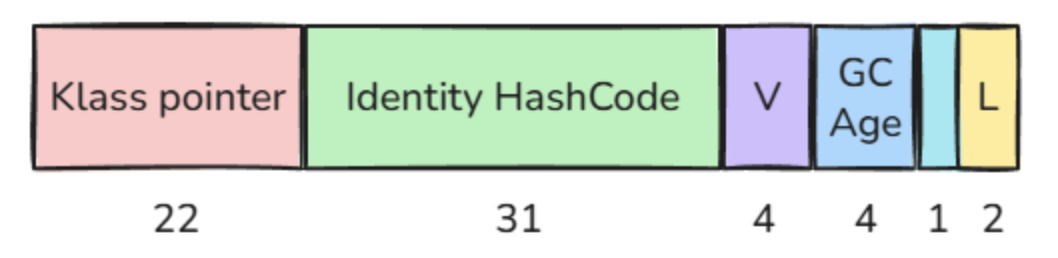
With this new structure, no bit is left unused anymore. The object header is now fully packed into a single 64-bit word.
To enable compact object headers, run the application with:
-XX:+UseCompactObjectHeaders
Compact object headers require compressed class pointers to be enabled and starting with JDK 25, the UseCompressedClassPointers option was deprecated and will likely be removed in a future release.
Now that we understand the idea behind compact object headers, let us verify it with JOL and compare the actual layouts produced by HotSpot.
Example 1: empty object
class Empty {
}

void main() {
   IO.print(ClassLayout.parseClass(Empty.class).toPrintable());
}
Without compact object headers:
OFF  SZ   TYPE DESCRIPTION                VALUE
 0   8        (object header: mark)     N/A
 8   4        (object header: class)    N/A
12   4        (object alignment gap)
Instance size: 16 bytes
Space losses: 0 bytes internal + 4 bytes external = 4 bytes total
With compact object headers:
OFF  SZ   TYPE DESCRIPTION                VALUE
 0   8        (object header: mark)     N/A
Instance size: 8 bytes
Space losses: 0 bytes internal + 0 bytes external = 0 bytes total
The object size goes from 16 bytes to 8 bytes.
Saved memory: 8 bytes
Reduction: 50%
Example 2: object with primitive fields
class User {
   int age;
   long id;
   boolean active;
}

void main() {
   IO.print(ClassLayout.parseClass(User.class).toPrintable());
}
Without compact object headers:
OFF  SZ      TYPE DESCRIPTION                VALUE
 0   8           (object header: mark)     N/A
 8   4           (object header: class)    N/A
12   4       int User.age                  N/A
16   8      long User.id                   N/A
24   1   boolean User.active               N/A
25   7           (object alignment gap)
Instance size: 32 bytes
Space losses: 0 bytes internal + 7 bytes external = 7 bytes total
With compact object headers:
OFF  SZ      TYPE DESCRIPTION                VALUE
 0   8           (object header: mark)     N/A
 8   8      long User.id                   N/A
16   4       int User.age                  N/A
20   1   boolean User.active               N/A
21   3           (object alignment gap)
Instance size: 24 bytes
Space losses: 0 bytes internal + 3 bytes external = 3 bytes total
The object size goes from 32 bytes to 24 bytes.
Saved memory: 8 bytes
Reduction: 25%
Example 3: field reordering and padding
class Reordering {
   Reordering reordering;
   boolean enabled;
}

void main() {
   IO.print(ClassLayout.parseClass(Reordering.class).toPrintable());
}
Without compact object headers:
OFF  SZ               TYPE DESCRIPTION                VALUE
 0   8                    (object header: mark)     N/A
 8   4                    (object header: class)    N/A
12   1            boolean Reordering.enabled        N/A
13   3                    (alignment/padding gap)
16   4   Main.Reordering Reordering.reordering     N/A
20   4                    (object alignment gap)
Instance size: 24 bytes
Space losses: 3 bytes internal + 4 bytes external = 7 bytes total
With compact object headers:
OFF  SZ               TYPE DESCRIPTION                VALUE
 0   8                    (object header: mark)     N/A
 8   1            boolean Reordering.enabled        N/A
 9   3                    (alignment/padding gap)
12   4   Main.Reordering Reordering.reordering     N/A
Instance size: 16 bytes
Space losses: 3 bytes internal + 0 bytes external = 3 bytes total
The object size goes from 24 bytes to 16 bytes.
Saved memory: 8 bytes
Reduction: 33.33%
Example 4: array layout
void main() {
   IO.print(ClassLayout.parseInstance(new int[5]).toPrintable());
}
Without compact object headers:
OFF  SZ   TYPE DESCRIPTION                VALUE
 0   8        (object header: mark)     0x0000000000000001
 8   4        (object header: class)    0x00184b48
12   4        (array length)             5
16  20    int [I.<elements>             N/A
36   4        (object alignment gap)
Instance size: 40 bytes
Space losses: 0 bytes internal + 4 bytes external = 4 bytes total
With compact object headers:
OFF  SZ   TYPE DESCRIPTION                VALUE
 0   8        (object header: mark)     0x0018640000000001
 8   4        (array length)             5
12  20    int [I.<elements>             N/A
Instance size: 32 bytes
Space losses: 0 bytes internal + 0 bytes external = 0 bytes total
The array size goes from 40 bytes to 32 bytes.
Saved memory: 8 bytes
Reduction: 20%
Conclusion & Key Takeaways
Compact object headers bring concrete benefits to Java applications. The most visible benefit is reduced heap usage. By shrinking the object header from 12/16 bytes to 8 bytes, HotSpot can make many objects smaller, especially small objects where the header represents a large part of the total footprint.
But the benefit is not only about memory. Smaller objects also improve memory density. More objects can fit in the same heap region, and more data can fit in the CPU cache. This improves data locality and can reduce cache misses, allowing the CPU to work more efficiently.
Measurable gains in production:
- OpenJDK: Early adopters observed live data reductions of around 10% to 20% on real-world applications.
Source: JEP 450 - Alibaba: Reported 5% to 10% memory reduction and up to 9% throughput improvement on their YiTian platform.
Source: Alibaba Cloud Blog - Amazon: Reported around 22% lower heap usage and 8% to 11% higher throughput.
Source: Lilliput FOSDEM 2025
-XX:+UseCompactObjectHeaders.
If you would like to explore the topic further, I highly recommend the following resources: