Jeśli w Twojej pracy pojawiały się kiedykolwiek dane rynkowe w czasie rzeczywistym w banku, funduszu hedgingowym czy na desku tradingowym, jest duża szansa, że były one gromadzone, przechowywane i analizowane za pomocą kdb+.
W dzisiejszym cyfrowym świecie dane zalewają organizacje w niespotykanym dotąd tempie – od transakcji finansowych po interakcje w mediach społecznościowych. Wyzwanie jest jasne: jak przetwarzać i analizować te dane w czasie rzeczywistym?
Weźmy rynki finansowe, gdzie nawet kilka milisekund opóźnienia może oznaczać utracone okazje lub realne straty. kdb+ powstał właśnie z myślą o takich wymaganiach. Jest powszechnie stosowany w bankach, funduszach hedgingowych i innych instytucjach finansowych, ale także w przemyśle, lotnictwie i telekomunikacji.
kdb+ to kolumnowa baza danych działająca w pamięci (in-memory) zaprojektowana z myślą o ekstremalnej wydajności na danych w postaci szeregów czasowych. Dostarczana jest razem z q, zwięzłym językiem przetwarzania wektorowego, stworzonym do odpytywania i przetwarzania dużych zbiorów danych przy minimalnej składni.

Razem tworzą ściśle zintegrowany system, w którym język i silnik przechowywania danych zaprojektowano jako jedną całość – nie ma rozdźwięku między sposobem pisania zapytań a sposobem przechowywania danych. To jeden z głównych powodów, dla których kdb+ konsekwentnie przewyższa bazy danych ogólnego przeznaczenia przy obciążeniach opartych na szeregach czasowych, obsługując miliony rekordów na sekundę z opóźnieniem rzędu kilku milisekund.
Każda instancja interpretera q nazywana jest procesem q, a rzeczywiste systemy kdb+ składają się z wielu procesów q, z których każdy pełni określoną rolę i komunikuje się z pozostałymi.
W tej trzyczęściowej serii zbudujemy od podstaw kompletną architekturę kdb+ tick krok po kroku. Zaczniemy od omówienia kluczowych pojęć i komponentów, następnie skonfigurujemy i uruchomimy w pełni działającą architekturę z tickerplantem, bazą danych czasu rzeczywistego, bazą historyczną i gatewayem. Na koniec rozbudujemy ją o usługi w Javie odpytujące kdb+, subskrybujące dane na żywo i publikujące transakcje za pomocą javakdb – biblioteki klienckiej dla kdb+.
Anatomia klasycznej architektury tick (vanilla)
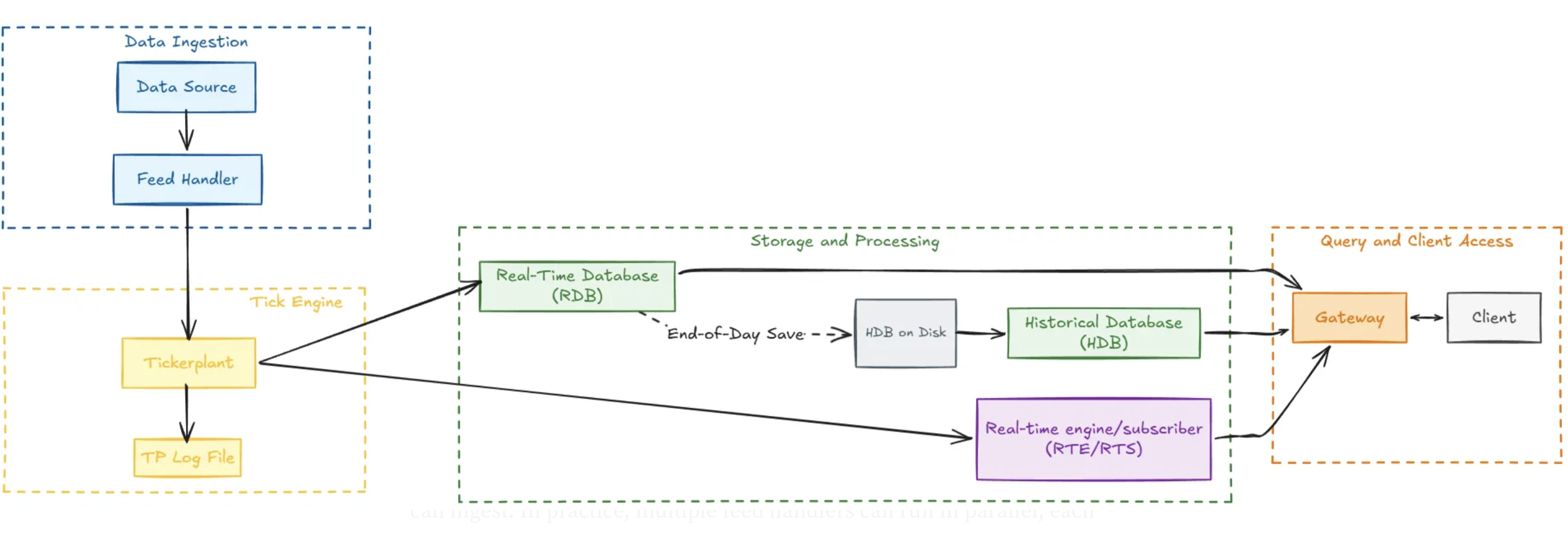
Poniższy diagram pokazuje, jak wygląda klasyczna architektura tick w ujęciu schematycznym. Przejdźmy przez kolejne komponenty i zobaczmy, jaką rolę każdy z nich odgrywa w całym ekosystemie.
Źródło danych – punkt wejścia architektury
To źródło danych w czasie rzeczywistym: notowań i transakcji finansowych od dostawców takich jak Bloomberg czy Refinitiv, odczytów z czujników w środowisku produkcyjnym lub dowolnego strumienia danych wysokiej częstotliwości. Takie strumienie docierają zwykle w zastrzeżonym formacie właściwym dla danego dostawcy.
Feed Handler – element między źródłem danych a systemem kdb+
Jego zadaniem jest parsowanie przychodzących danych z zastrzeżonego formatu do struktury, którą kdb+ może przyjąć. W praktyce wiele feed handlerów może działać równolegle, a każdy z nich pobiera dane z innego źródła i przekazuje je do systemu w celu przechowywania i analizy. KX udostępnia interfejsy Fusion łączące kdb+ z szeregiem zewnętrznych technologii, m.in. R, Apache Kafka, Javą, Pythonem i C.
Tickerplant (TP) – najważniejszy komponent architektury
Działający jako tickerplant proces q przechwytuje początkowy strumień danych, zapisuje każdy rekord w pliku logu i publikuje komunikaty do wszystkich zarejestrowanych subskrybentów. Głównym celem jest przepustowość bez opóźnień (zero-latency); tickerplant obsługuje też przyjmowanie danych w trybie wsadowym, co zwiększa wydajność.
Oprócz przekazywania danych tickerplant zarządza subskrypcjami – dodaje i usuwa subskrybentów oraz wysyła im definicje tabel – a także obsługuje przetwarzanie na koniec dnia (end-of-day, EOD). Skrypt tick.q stanowi implementację referencyjną i jest punktem wyjścia dla większości środowisk.
Kluczowa zasada projektowa: tickerplant powinien pozostać lekki. Nie powinien przechowywać danych i powinien zużywać minimalną ilość pamięci. Dla najlepszej odporności i uniknięcia rywalizacji o zasoby powinien działać na dedykowanych rdzeniach.
TP Log – plik logu tickerplantu rejestruje każdy komunikat, który tickerplant otrzymuje od feed handlera
Jego podstawowym celem jest odtwarzanie stanu: jeśli RDB ulegnie awarii lub wymaga restartu, plik logu jest odtwarzany, aby odbudować bieżący stan i uniknąć utraty danych.
Dla optymalnej wydajności plik logu powinien znajdować się na szybkim dysku lokalnym – minimalizuje to opóźnienie publikacji i czas oczekiwania na operacje I/O.
Real-Time Database (RDB)
Proces q, który subskrybuje tickerplant i przechowuje wszystkie przychodzące komunikaty w pamięci, udostępniając dzisiejsze dane do zapytań w ciągu dnia.
Przy starcie RDB łączy się z tickerplantem i otrzymuje schemat danych, lokalizację pliku logu TPoraz liczbę wierszy do odtworzenia – dzięki temu nadrabia dane otrzymane, zanim sam zaczął działać. Od tego momentu otrzymuje aktualizacje na żywo w miarę ich publikowania przez tickerplant.
Na koniec dnia RDB zapisuje dane z bieżącego dnia do bazy historycznej, wysyła komunikat EOD i czyści swoją pamięć przed kolejnym dniem sesyjnym. Skrypt r.q stanowi implementację referencyjną, od której można zacząć.
Real-Time Subscriber (RTS) – nazywany też real-time engine (RTE) lub complex event processor (CEP).
Ten proces q subskrybuje tickerplant tak samo jak RDB, ale zamiast tylko przechowywać surowe dane, wykonuje dodatkową logikę na każdym przychodzącym komunikacie – na przykład wylicza arkusz zleceń, utrzymuje podtabelę z ostatnią ceną każdego instrumentu albo prowadzi analitykę strumieniową i agregacje.
Historical Database (HDB)
Proces q, który udostępnia do zapytań magazyn danych historycznych – wszystkiego, co RDB zapisał na dysku na koniec dnia. Typowe zastosowania to raporty dotyczące czasów realizacji zleceń czy analizy awarii czujników.
Duże tabele są przechowywane na dysku z podziałem na partycje według daty, a każda kolumna zapisywana jest w osobnym pliku. Partycje dzienne to podstawa struktury dyskowej kdb+ i jeden z głównych czynników jego wydajności zapytań: do pamięci wczytywane są tylko potrzebne partycje i kolumny, co minimalizuje narzut I/O przy dużych zbiorach danych.
Gateway (GW)
To pojedynczy punkt wejścia do systemu kdb+ dla użytkowników końcowych i aplikacji zewnętrznych. Gateway przyjmuje zapytania, kieruje je do właściwych procesów – RDB, HDB lub RTS – i zwraca wyniki. W wielu konfiguracjach gateway łączy się zarówno z danymi czasu rzeczywistego, jak i historycznymi, dzięki czemu użytkownicy mogą płynnie odpytywać oba źródła, nie wiedząc, gdzie znajdują się dane. Potrafi też łączyć wyniki z wielu procesów w jedną odpowiedź oraz obsługiwać zagadnienia przekrojowe, takie jak uprawnienia i równoważenie obciążenia.
Poza wersją klasyczną: alternatywne architektury tick
Chained tickerplant
Jeśli główny tickerplant działa w trybie zero-latency, czyli publikuje każdą aktualizację natychmiast, podłączanie klienta, który odświeża wykres co kilka sekund, staje się marnotrawstwem. Rozwiązaniem jest chained tickerplant – subskrybuje on główny tickerplant jak każdy inny odbiorca, a następnie ponownie publikuje dane swoim subskrybentom z mniejszą częstotliwością. W przeciwieństwie do głównego tickerplantu nie prowadzi własnego pliku logu.
Na przykład dashboard z interfejsem graficznym nie potrzebuje setek aktualizacji na sekundę. Chained tickerplant grupujący aktualizacje co 1000 milisekund w zupełności wystarczy. Możliwe jest też łączenie w łańcuch na wielu poziomach, co pozwala dopasować częstotliwość aktualizacji do potrzeb każdego odbiorcy.
Chained RDB
Ta sama zasada dotyczy RDB. Chained RDB subskrybuje główny tickerplant lub chained tickerplant, ale w odróżnieniu od domyślnego RDB nie wykonuje żadnego przetwarzania na koniec dnia poza wyczyszczeniem tabel. Korzyścią jest izolacja: zwykli użytkownicy odpytują chained RDB, a główny RDB może skupić się na przechwytywaniu danych.
Chained RDB nie musi też subskrybować pełnego zbioru danych. Może przechowywać tylko instrumenty z określonego indeksu albo subskrybować transakcje bez notowań. Ceną jest pamięć – każdy RDB to niezależny proces działający w pamięci, bez współdzielonego stanu.
Write-only RDB
W niektórych konfiguracjach RDB nigdy nie jest odpytywany w ciągu dnia – jego jedynym zadaniem jest zapisanie danych do HDB na koniec dnia. W takim przypadku trzymanie w pamięci danych z całego dnia jest niepotrzebnie kosztowne. Write-only RDB rozwiązuje ten problem: buforuje przychodzące rekordy i zrzuca je partiami na dysk po osiągnięciu skonfigurowanego progu liczby wierszy. Na koniec dnia pozostałe dane są zrzucane, sortowane na dysku i przenoszone do odpowiedniej partycji dziennej w HDB.
To podejście radykalnie zmniejsza zużycie pamięci, ma jednak ograniczenie: proces przechowuje w danym momencie tylko niewielki bufor o zmiennej wielkości, więc nie nadaje się do zapytań w ciągu dnia.
Szeregi czasowe pod kontrolą dzięki kdb+
Świat danych wysokiej częstotliwości wymaga czegoś więcej niż samego przechowywania: potrzebuje precyzji, szybkości i solidnej architektury. Jak pokazaliśmy w tej pierwszej części, architektura kdb+ tick to kręgosłup współczesnego handlu elektronicznego i analityki w czasie rzeczywistym.
Chcesz wdrożyć własny system danych rynkowych lub zoptymalizować obecny stos kdb+? Eksperci MARGO specjalizują się w obliczeniach o wysokiej wydajności i technologiach finansowych.
Skontaktuj się z naszymi ekspertami!Dlaczego do danych rynkowych wybiera się kdb+ zamiast tradycyjnych baz SQL?
Tradycyjne systemy RDBMS nie radzą sobie z ogromną ilością i tempem napływu danych w postaci szeregów czasowych. kdb+ wykorzystuje kolumnowy model przechowywania i język przetwarzania wektorowego (q), dzięki czemu przetwarza miliony rekordów na sekundę z opóźnieniem poniżej milisekundy.
Na czym polega podstawowa różnica między RDB a HDB?
Real-Time Database (RDB) przechowuje dane z bieżącego dnia w pamięci RAM, zapewniając natychmiastowy dostęp. Historical Database (HDB) udostępnia do zapytań dane z poprzednich dni zapisane na dysku, zwykle podzielone na partycje według daty.
Jak tickerplant (TP) zapobiega utracie danych podczas awarii?
TP zapisuje każdy przychodzący rekord w pliku TP Log na dysku, zanim go opublikuje. Jeśli subskrybent, taki jak RDB, ulegnie awarii, po restarcie może odtworzyć ten plik logu i w pełni odbudować swój stan aż do ostatniej milisekundy.
Kiedy używać chained tickerplantu zamiast głównego?
Chained tickerplant sprawdza się u odbiorców, którzy nie potrzebują aktualizacji tick po ticku (np. interfejsów graficznych). Grupując aktualizacje co sekundę, odciążasz główny tickerplant i ograniczasz ruch sieciowy generowany przez mniej krytycznych subskrybentów.
Czy Java współpracuje z architekturą kdb+?
Oczywiście. Dzięki bibliotece javakdb usługi w Javie mogą pełnić rolę feed handlerów, subskrybować tickerplant, aby otrzymywać aktualizacje w czasie rzeczywistym, lub odpytywać HDB przez gateway, łącząc logikę biznesową z wydajnością kdb+.